
|
| Car 2 |
15 points
Introduction
This program simulates the functioning of a car. It is text-based and the output you'll see when you run the completed program comes from the print statements you put in each method.
Instance Variables
You'll need 7 instance variables: the car's year (integer), model (String), color (String), miles-per-gallon (double), mileage (double), fuelLevel (double), and gasTankSize (double).
menu()
Give the user a series of options. This menu should repeat (inside a while loop) until the user chooses to quit. After asking a question with a 'System.out.print()' you can wait for the user's integer answer and record the answer with code like this: int choice = in.nextInt();
If the input from the user might be a double, you can record the answer like this:
double choice2 = in.nextDouble();
If the input from the user is a String, you can use this:
String choiceStr = in.nextLine();
If the input from the user is a single word, you can use this:
String word = in.next();
If you'd like, you can use the 'switch' command in lieu of if statements. The beginning of this switch statement might look like this:
switch (choice)
{
case 1: drive();
break;
case 2: addFuel();
break;
If 'choice' is equal to 1 in the code above, drive() is called. If 'choice' is equal to 2, addFuel() is called, and so on. It is necessary to conclude each 'case' statement with 'break'.
drive()
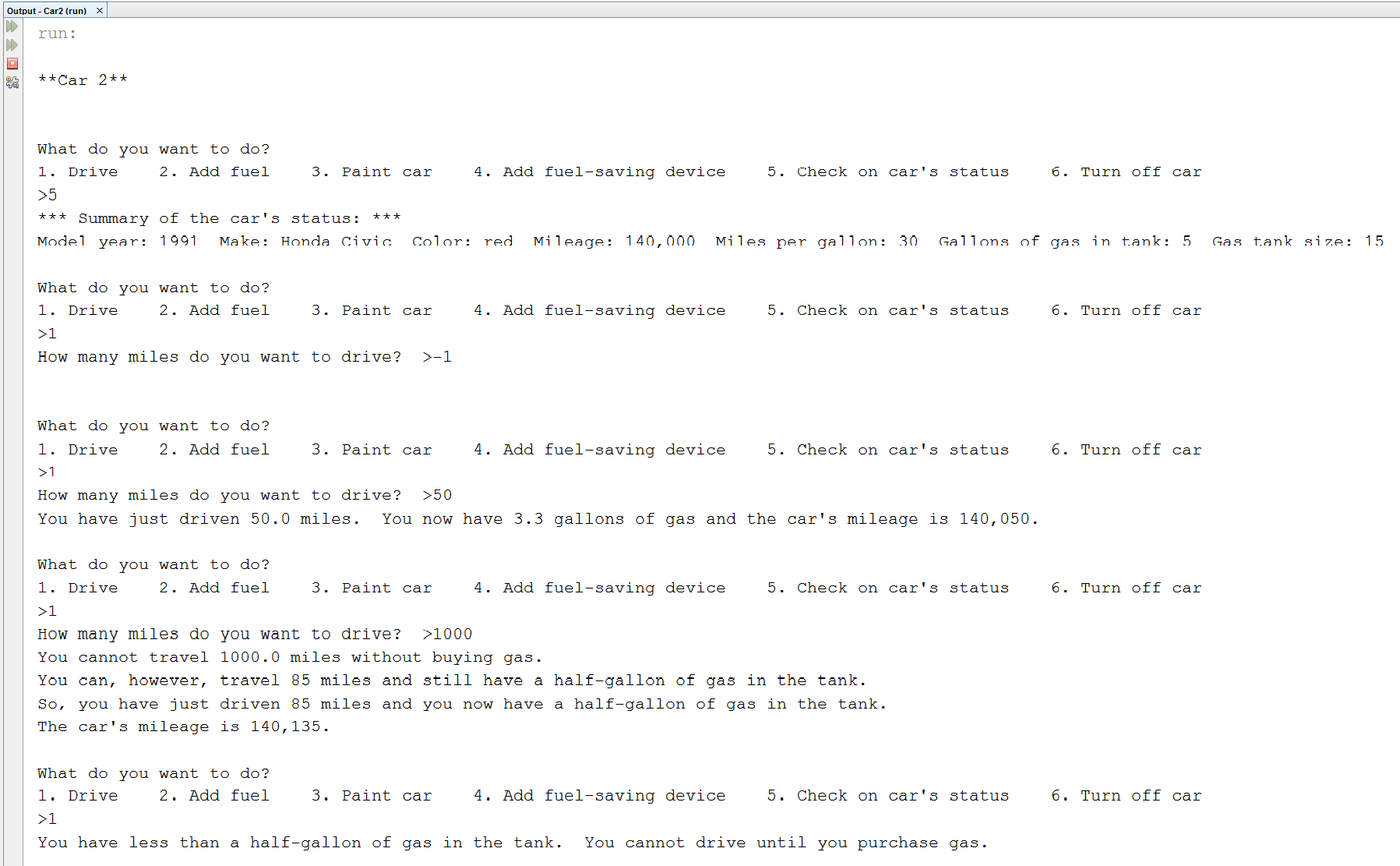
Here is how the completed version of the program handles 4 different situations:
| Situation | Program's response |
| The car has just 1 gallon (or less) of gas left. | The driver is not asked how many miles they want to drive. They are told to buy gas. |
| The driver wants to drive more miles than they can with the fuel they have. | The variable 'milesPossible' has been calculated as the number of miles the driver can travel and leave 1 gallon of gas in the tank. The driver is allowed to drive 'milesPossible' miles. The mileage and fuelLevel are updated. |
| The driver enters a negative number for the number of miles they want to drive. | The program doesn't respond. It simply pops up the question "What do you want to do?" again. |
| The driver wants to drive a reasonable number of miles. | The driver drives. The mileage and fuelLevel are updated. |
Here's how you could structure this in your program:
if (fuelLevel is less than or equal to 1)
{ ...
else
{
ask the user how far they want to travel ('miles')
if ('miles' is greater than 0)
{
calculate 'milesPossible'
if ('miles' is greater than 'milesPossible')
{
update 'mileage' and 'fuelLevel' and write a message
}
else
{
update 'mileage' and 'fuelLevel' and write a message
}
}
}
The screenshot below shows how the drive() method should function.
addFuel()
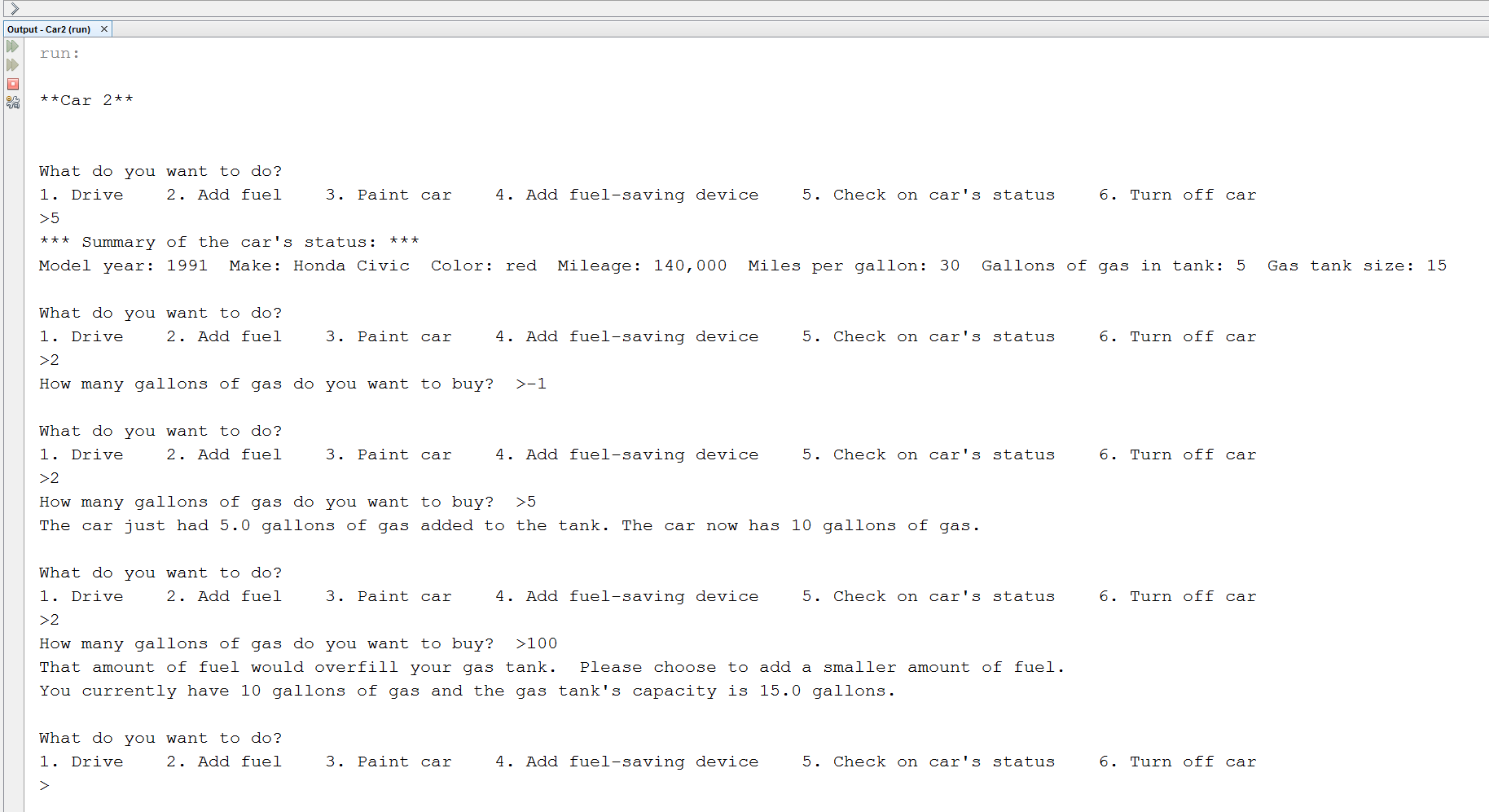
Ask the user how much gas they want to purchase. Check if this amount of gas would overfill the gas tank. If it would, notify the user of this problem and ask him to try again. If the amount of gas is OK, figure out the new 'fuelLevel' and print the results. If the user enters a negative number, do nothing.
The screenshot below illustrates addFuel():
addDevice()
Add 5 mpg to 'mpg' when this method is called. However, set it up so that this method can only be called once. If the user calls addDevice() more than once, print a message that this fuel-saving device has already been added, and can only be added once.
changeColor()
Ask the user what color they want the car to be. Update the car's color.
main()
Create your car, and call menu().
Running your program
Your program runs interactively in the console window. In NetBeans, you may want to make the font size larger. To do this, click in the console window and hit "CTRL - up arrow," or right-click and choose "Larger Font".
Starting Point
You can download Car2.java to use as a starting point in writing your program.